Devs for Devs: From AI-Generated Code to AI-Assisted Engineering

Devs for Devs: From AI-Generated Code to AI-Assisted EngineeringFrom world-class developers, straight to you.
Let’s call it some technical issues. 😅 Instead of Sunday, we’re publishing “Devs for Devs” on Monday. This week, I’m happy to have Vinicius Serpa Pansan, an iOS developer with 4 years of experience building apps with a focus on performance and user experience. Based in São Paulo, Brazil, he works across the Apple ecosystem with technologies including Swift, SwiftUI, UIKit, and AppKit. He shares his experience with AI-assisted app creation. Let’s check how to check, verify and adapt the AI-assisted code. P.S. You can check out Vinicius’s work on LinkedIn, and Git.
Subscribe if you’re new here! 👋 A few months ago I started building Fio, a voice-first journaling app for iOS. The core idea is simple: speaking is faster than typing, so instead of asking someone to type out their day, you just talk, and the app transcribes and saves it. No decision required at the moment of capture, no folder to choose, no structure to commit to. Just speak, and it’s there. I built it entirely in SwiftUI, and from day one, Claude Code and Codex were part of the actual development process, not a tool I reached for occasionally, but something I used in nearly every session. My first instinct, like most people’s, was to use AI the obvious way: describe what I wanted, get a working implementation, accept it, move to the next screen. It’s the fastest path from idea to shipped feature, and for a while, it felt like exactly the right call. Screens came together quickly. Features that would have taken me a full evening to hand-write were done in twenty minutes. Then, a few weeks in, I noticed something that bothered me more than it should have. I’d finish a session having built something that worked, and if you’d asked me to explain why it was built that particular way, instead of some other reasonable way, I sometimes couldn’t answer with confidence. I knew what the code did. I didn’t always know why it was the right shape for the problem. That gap is easy to ignore when everything is working. It stops being easy to ignore the moment you have to defend a decision, in a code review, in an interview, or just to your future self six months later trying to remember why you did something a certain way. This is the story of how I closed that gap, and the four-step loop I ended up building around it.
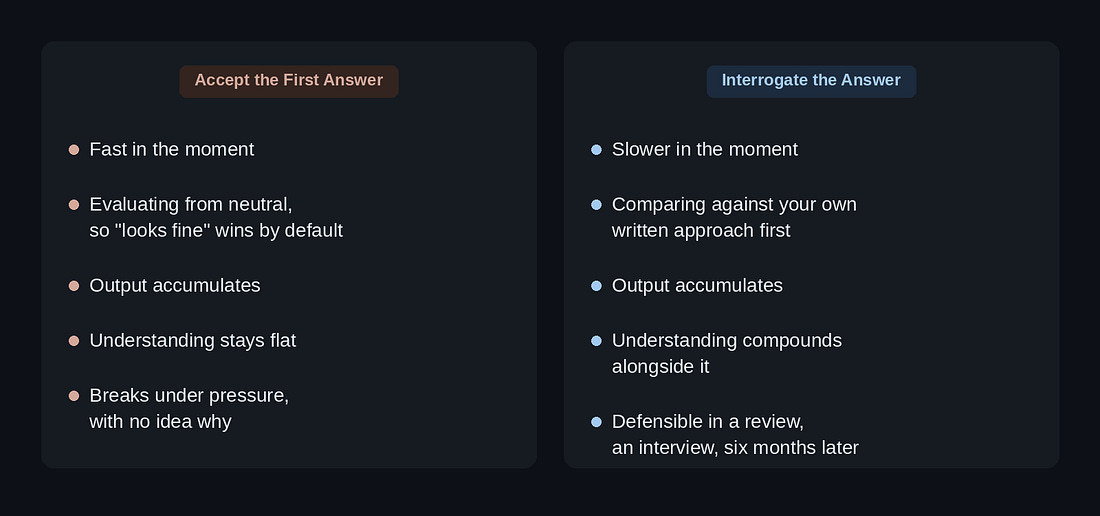
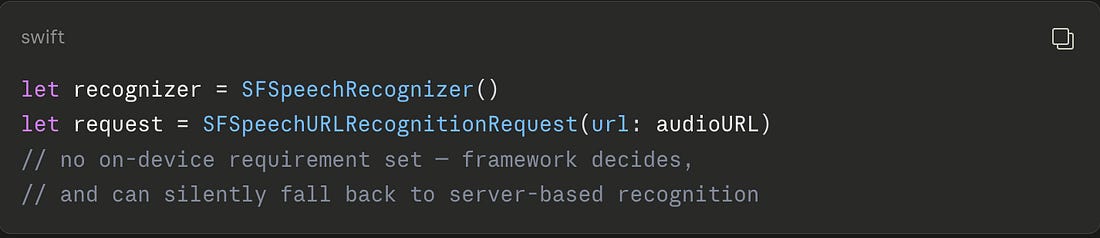
The Problem with Just Accepting the OutputThe default AI workflow most developers fall into is straightforward: describe a problem, get a suggestion, skim it, it looks reasonable, accept it, move to the next task. It’s fast, and it feels productive, because things keep getting built. Velocity is visible. Understanding isn’t, so it’s easy to quietly deprioritize. The moment this stopped being abstract for me was a decision that actually mattered for Fio: how to handle voice transcription. The app’s entire premise rests on a privacy promise, you speak, it’s transcribed, and nothing leaves the device unless you explicitly choose to back it up to your own iCloud. No audio ever touches a server. That’s not a minor implementation detail, it’s the reason the app exists in the shape it does. If I had approached that the way I approached the first dozen smaller features, describe “add voice transcription,” accept the first working version, I likely would have ended up with something that technically transcribed audio just fine, but quietly assumed a server round-trip somewhere in the pipeline, because that’s the default shape most transcription examples and tutorials reach for online. It would have worked. It would have also violated the one promise the entire app is built around, and I might not have caught it until much later, possibly after the architecture around it was already hard to unwind. Nothing about that outcome would have been the AI’s fault, to be clear. I was the one who hadn’t specified the constraint, hadn’t asked why a particular approach was chosen over another, hadn’t treated the output as something to interrogate rather than something to accept. The tool did exactly what I asked. I just hadn’t asked precisely enough, because I wasn’t in the habit of asking at all. That’s the moment I stopped treating AI output as a finished answer and started treating it as a first draft that owed me an explanation Here’s the difference in practice. The version I almost shipped would have looked something like this:
The version that actually matches Fio’s privacy promise sets one property explicitly:
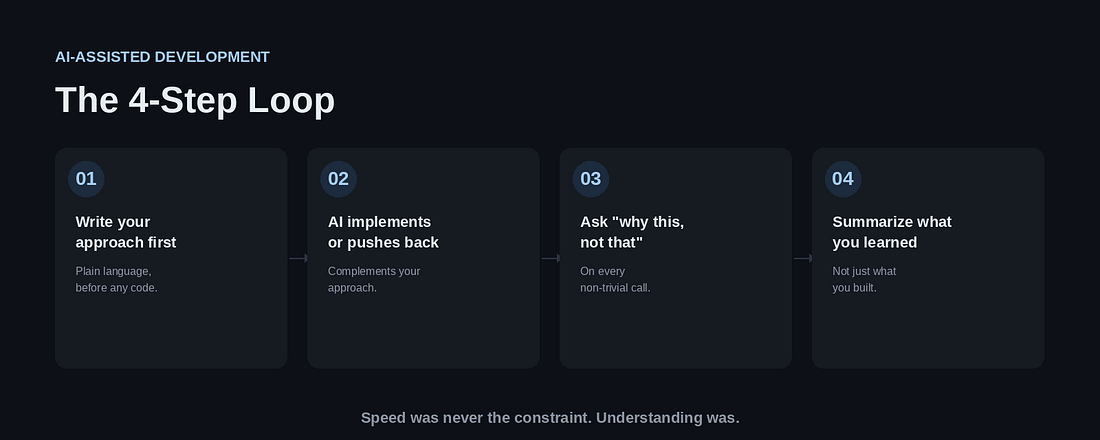
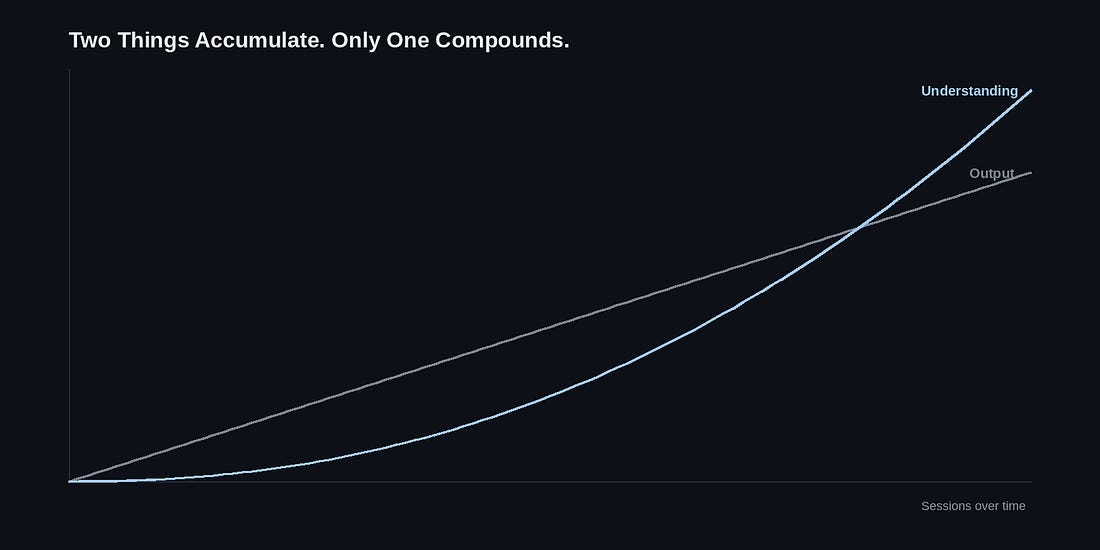
One line. But it’s the line that turns “probably private” into “actually private,” and it’s exactly the kind of detail that’s easy to skip when you’re evaluating from a neutral position instead of comparing against something you wrote yourself first. The Loop I Built InsteadI didn’t design this all at once. It came together step by step, each addition responding to a specific way the “just accept it” habit had already failed me. Step 1: Write Your Own Approach Before Asking for OneBefore I ask Claude Code or Codex to implement anything non-trivial, I write, in plain language, how I think it should work. Not code. A paragraph, sometimes just a few sentences. What matters isn’t the polish, it’s that I commit to an opinion before I see someone else’s, even an AI’s. This sounds like a small thing, but it changes the psychology of the whole exchange. When you ask first and see the answer second, you’re evaluating from a neutral position, and neutral positions default to “looks fine” far more often than they should. When you write your own approach first, you have something to compare against, and comparison is a completely different cognitive act than approval. You’re no longer asking “does this look right?” You’re asking “where does this differ from what I expected, and why?” More than once, my written approach turned out to be missing something the AI’s version accounted for, and I learned from the gap. Just as often, my approach was actually right, and the AI’s first suggestion took a shortcut I didn’t want, which I only caught because I had something concrete to compare it to. Step 2: Let It Implement or Push Back, Not ReplaceOnce there’s a direction, the AI’s role is to build within it, and to flag problems it can see that I can’t, not to substitute its own direction for mine by default. This is a subtle distinction, but it changes how I write prompts. Instead of “build a sync mechanism for offline notes,” I’ll say something closer to “here’s how I want to structure the sync mechanism, tell me what breaks.” That framing invites pushback instead of discouraging it. And when the pushback comes, it’s usually specific and useful, because it’s responding to a concrete proposal rather than generating one from scratch. Step 3: Ask “Why This, Not the Alternative” on Every Non-Trivial CallThis is the step that actually catches the cases like the transcription example, the ones that are quietly wrong by default, not obviously wrong. If I can’t explain, in my own words, why a piece of implementation exists the way it does, I don’t move forward, regardless of whether the code compiles and the tests pass. Sometimes the answer the AI gives is genuinely good, something I hadn’t considered, and I learn from it directly. Sometimes asking the question reveals that I framed the original request incorrectly, and the more useful fix is upstream of the code entirely. Either way, I come out of the exchange knowing something I didn’t know when I asked. Step 4: Close Every Session by Summarizing What You LearnedNot what got built. What got understood? At the end of a session, I ask for a short summary of the concepts we touched, framed as though I had to explain them to someone else afterward, a teammate, an interviewer, my future self debugging this in six months. This is the habit that turns a series of coding sessions into something that compounds instead of something that just accumulates. It’s also, practically speaking, what makes a project like this defensible later. When you can explain not just what a piece of code does but why it exists in that shape, you’re not reciting an AI’s explanation from memory, you’re demonstrating that the understanding is actually yours.
What ChangedFio still isn’t public, so I’m not going to pretend this loop is the reason the app is good. What I can say with confidence is narrower and, I think, more useful: I know exactly why every non-trivial decision in it was made. That wasn’t true a few weeks earlier, when I was moving faster and understanding less, and it’s a different thing entirely from knowing that the code works. That distinction matters more than it might seem to at first. Code that works is a snapshot. Understanding why it works, and why the alternative wasn’t chosen, is what lets you extend it, debug it under pressure, or explain it convincingly to someone else, none of which “it works” guarantees on its own. I think this is the trade worth naming clearly, because it’s easy to miss in the current wave of AI-assisted development: speed was never actually the constraint holding most developers back. Understanding was, and it’s always been the harder, slower thing to build, which is exactly why it was the first thing to get cut whenever a faster path appeared. AI is, among other things, a very fast path. It removed a real excuse people used to have for skipping the “why”, there simply wasn’t time, someone had to just ship the thing. That excuse is mostly gone now. What’s left is a choice, made consciously or not, every time you accept a suggestion: build the loop that forces understanding, or don’t, and get code that works until, one day, it doesn’t, and you’re left debugging something you never actually understood in the first place. The question worth asking isn’t “am I using AI?” anymore. At this point, most of us are, and the answer says less than it used to. The more useful question is narrower: after this session, do I know more than I did before it started, or am I just further along? If you’re building something with AI as an active part of your process and want to compare notes on what’s working and what isn’t, feel free to reach out. I’m always happy to talk through it.
Subscribe if you’re new here! 👋 Every Wednesday news, every Sunday tips from devs!
|